Create
Create QR codes & barcodes
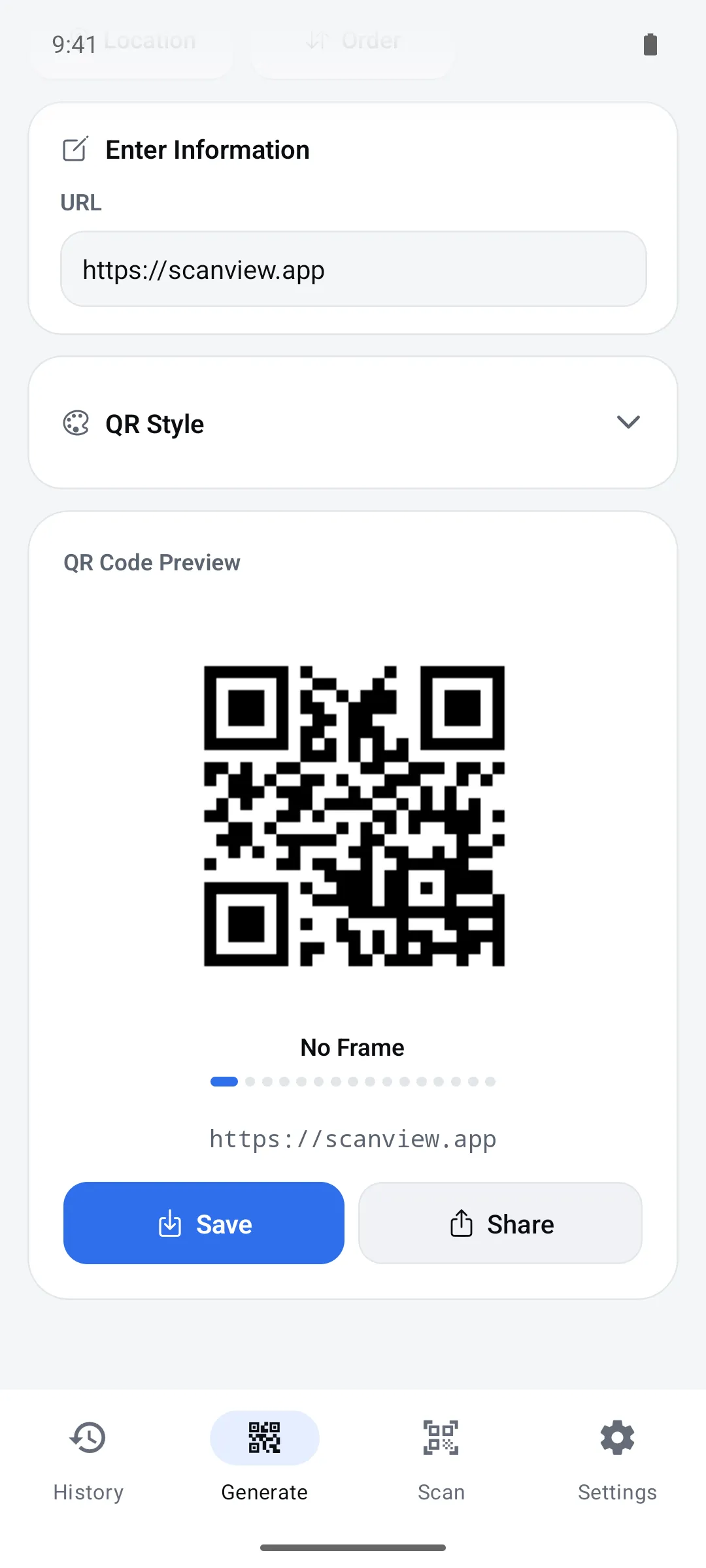
Turn links, contacts, Wi-Fi and events into QR codes, and product, logistics, medical and postal numbers into barcodes. Pick dot shapes, colors, frames, error correction level and save resolution.
How to use it
Choose QR Code or Barcode on the Generate tab
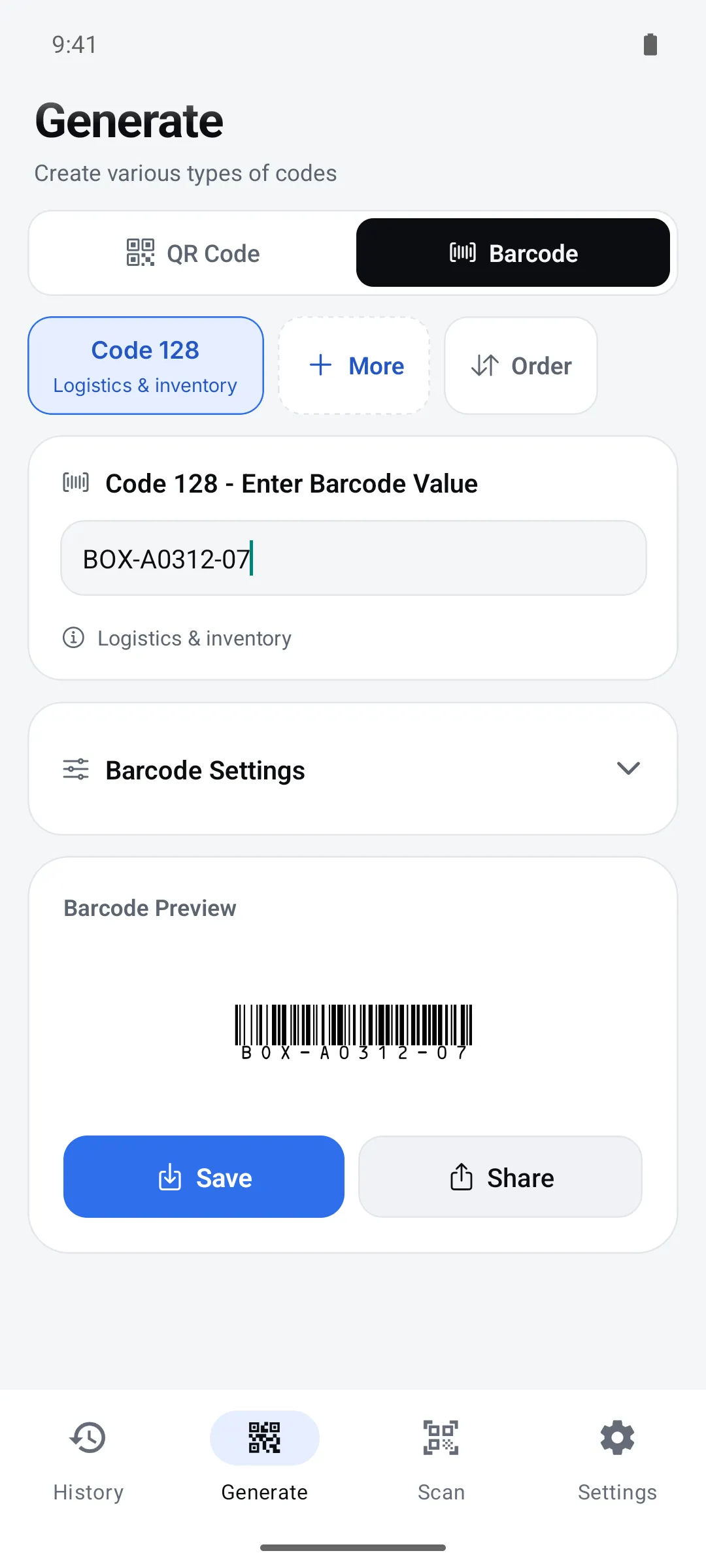
Pick an information type for QR codes (Text, Website, WiFi…) or a code type for barcodes (Code 128, EAN-13…). Use “Order” to move the types you use most to the front.
Enter the content
Fields match the type you picked. The preview updates as you type, and barcodes show why an input isn’t valid right below the field.
Style it, then save or share
Adjust the look and save quality under “QR Style” or “Barcode Settings”, then tap Save (to your gallery) or Share.
QR code types
There are 10 information types. Non-Latin text such as Korean works fine (UTF-8).
| Type | Fields | What’s encoded |
|---|---|---|
| Text | Text | The text as typed |
| Website | URL | The address as typed (include https:// yourself) |
| Contact | Name, Phone, Email, Company, Title, Address | vCard 3.0 contact card (empty fields are left out) |
| WiFi | WiFi Name (SSID), Password, Security | WIFI:T:…;S:…;P:…;; — scanning it joins the network |
| Clipboard | Text (filled from your clipboard when you pick it) | The text as typed |
| Recipient, Subject, Message | mailto: link with subject and body | |
| SMS | Phone, Message | sms: link with body |
| Phone | Phone | tel: link |
| Event | Event Title, Location, Start Date, End Date, Description | VEVENT calendar entry (enter dates as YYYYMMDD) |
| Location | Select from Map, or Latitude and Longitude | geo:latitude,longitude |
- WiFi security: WPA/WPA2 (default), WEP, No Security
- Location: tap the map, search for an address, or use your current location
Styling QR codes
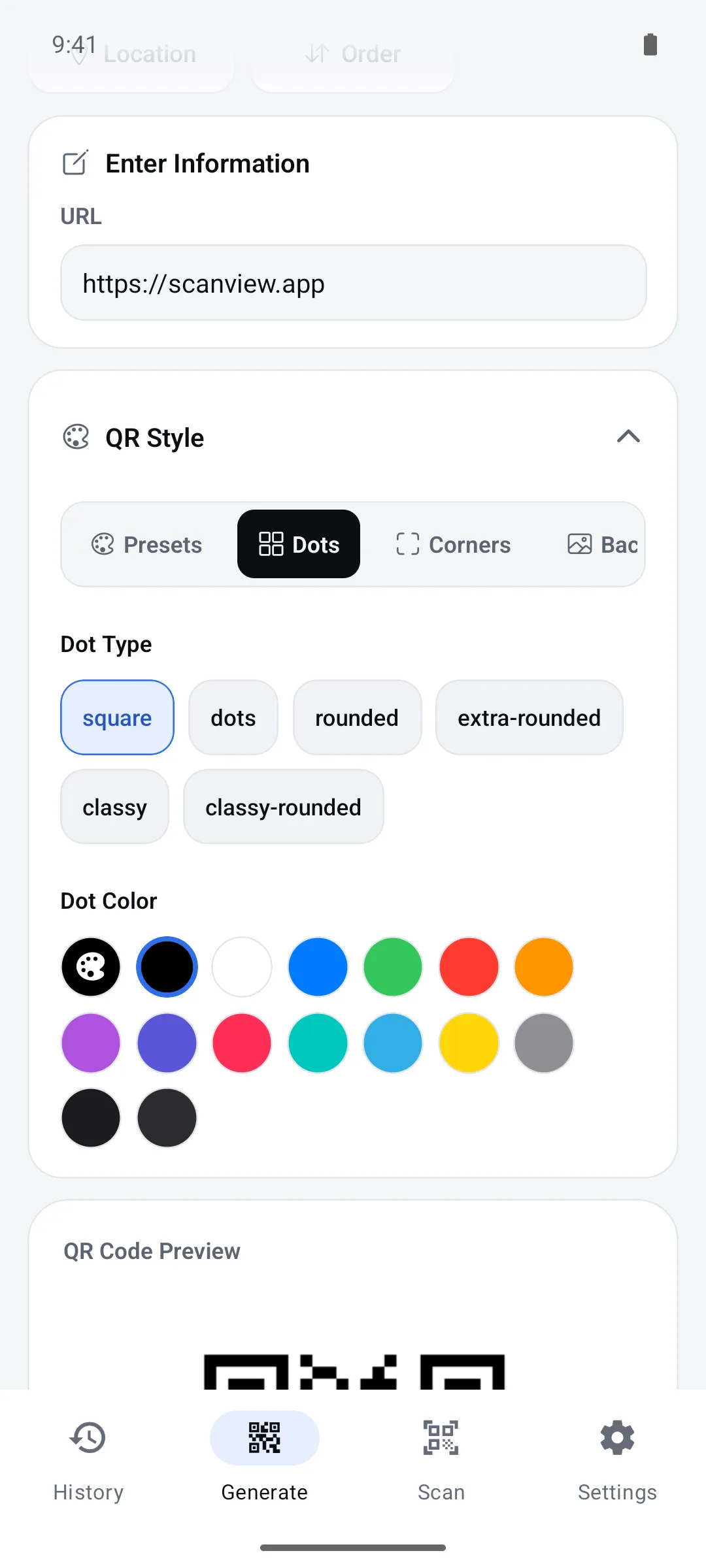
Under “QR Style”, adjust Dots, Corners, Background, Text and Settings. The preview updates right away.
| Option | Choices |
|---|---|
| Dot shape | square, dots, rounded, extra-rounded, classy, classy-rounded (6) |
| Corner square shape | square, dot, extra-rounded (3) |
| Corner dot shape | square, dot (2) |
| Dot & background color | 15 common colors, or a color wheel / HEX |
| Corner colors | 10 common colors or custom, set separately from the dots |
| Frame | No Frame + 15: Envelope, Play Button, Hand Phone, Film Strip, Beer Mug, Car, Coffee Cup, Smartphone, Receipt, Calendar, Clipboard, Chat Bubble, Notebook, Shopping Bag, Gift Box (swipe the preview to choose) |
| Frame text color | Auto (black or white to suit the background), 10 colors, or custom — the frame text is fixed to “Scan me!” |
| My presets | Save the current style and frame under a name (up to 20 characters), tap to apply, long-press to delete. “Default” resets anytime |
Error correction level
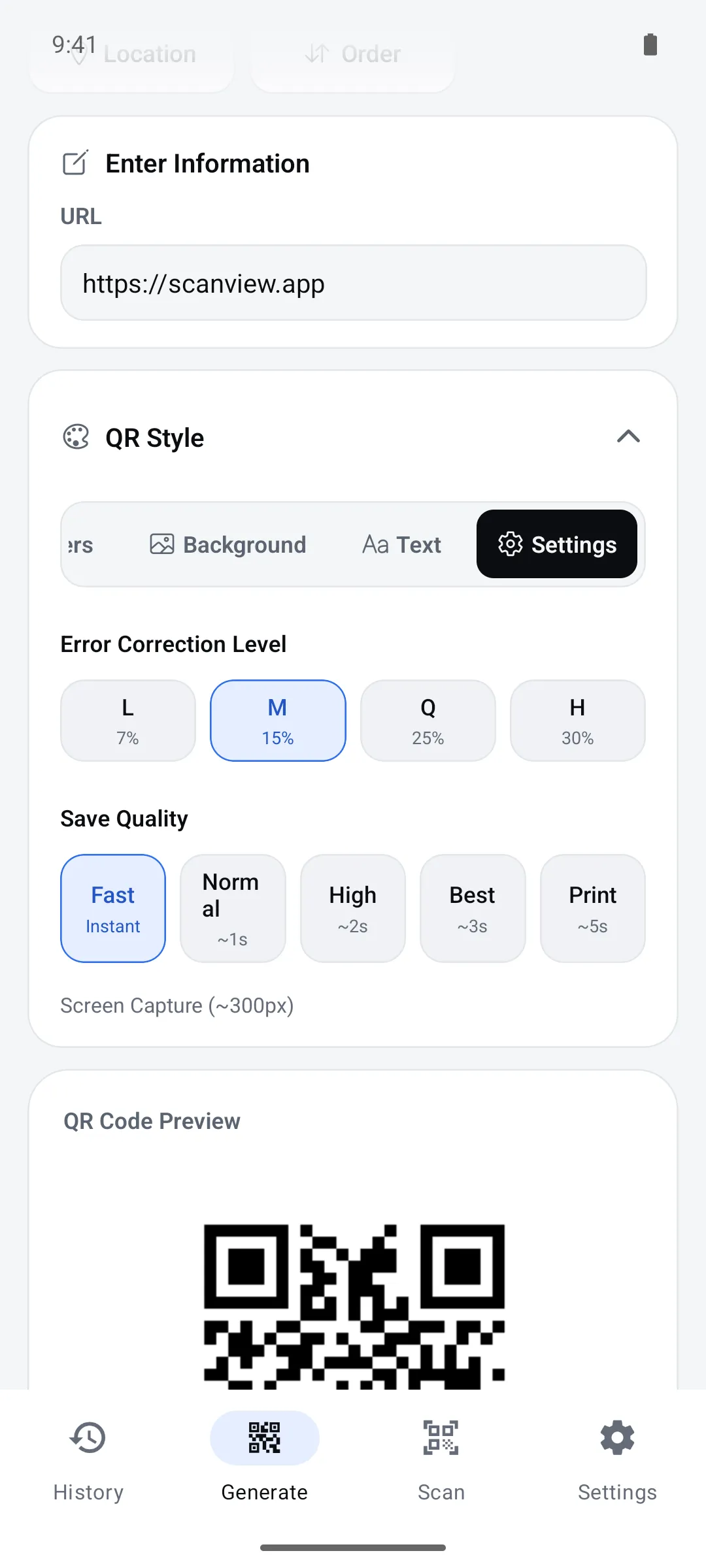
QR codes carry extra data so they still scan when part of the code is dirty or covered. Higher levels survive more damage, but the same content needs more modules, so the code gets denser. Choose it under QR Style > Settings.
| Level | Recoverable damage | Good for |
|---|---|---|
| L | about 7% | Screens or large, clean prints; lots of content |
| M (default) | about 15% | Most prints — flyers, business cards, posters |
| Q | about 25% | Warehouse and factory labels that may get scratched or dirty |
| H | about 30% | Outdoor or rough use, or where part may be covered |
Save resolution
Files are saved as PNG. Pick a higher quality for printing; higher quality takes a little longer.
QR codes (QR Style > Settings > Save quality)
| Save quality | Size | Time |
|---|---|---|
| Fast (default) | 300px | Instant (screen capture) |
| Normal | 600px | About 1s |
| High | 900px | About 2s |
| Best | 1200px | About 3s |
| 1800px | About 5s |
Barcodes (Barcode Settings > Save)
| Save quality | Approx. width | Use |
|---|---|---|
| Fast (default) | Screen size | Screen capture |
| Normal | about 400px | General printing |
| High | about 600px | High quality |
| Best | about 800px | Best quality |
| about 1200px | Large prints |
78 barcode types
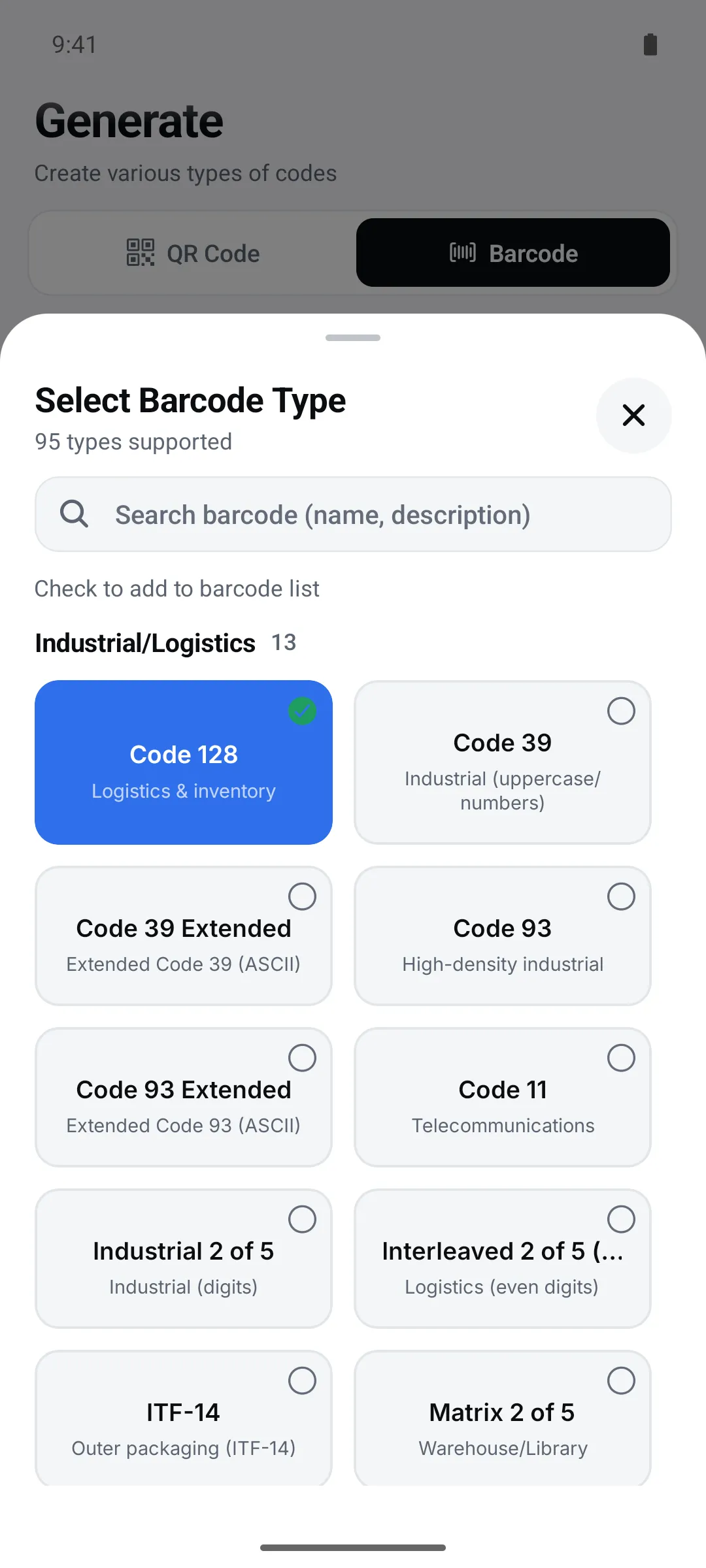
Only Code 128 shows at first. Check the types you need under “More” to add them, and search by name or use. For general 2D codes (QR, Data Matrix, PDF417…) use the QR Code tab; this list only includes GS1 and medical 2D variants.
Industrial & logistics (13)
| Barcode | Use |
|---|---|
| Code 128 | Logistics & inventory |
| Code 39 | Industrial (uppercase & digits) |
| Code 39 Extended | Full ASCII Code 39 |
| Code 93 | High-density industrial |
| Code 93 Extended | Extended Code 93 |
| Code 11 | Telecom equipment |
| Industrial 2 of 5 | Numeric industrial |
| Interleaved 2 of 5 (ITF) | Logistics (even number of digits) |
| ITF-14 | Cases & pallets |
| Matrix 2 of 5 | Numeric industrial |
| COOP 2 of 5 | Numeric only |
| IATA 2 of 5 | Air cargo |
| Datalogic 2 of 5 | Numeric only |
Retail (13)
| Barcode | Use |
|---|---|
| EAN-13 | International products (13 digits) |
| EAN-8 | Small products (8 digits) |
| EAN-5 | Add-on (book price) |
| EAN-2 | Add-on (magazine issue) |
| UPC-A | US & Canada products |
| UPC-E | Compact US products |
| ISBN | Books |
| ISMN | Printed music |
| ISSN | Periodicals |
| EAN-13 Composite | EAN-13 composite |
| EAN-8 Composite | EAN-8 composite |
| UPC-A Composite | UPC-A composite |
| UPC-E Composite | UPC-E composite |
GS1 & logistics (14)
| Barcode | Use |
|---|---|
| GS1-128 | GS1 logistics |
| GS1 Composite | GS1 composite |
| GS1 DataBar Omnidirectional | DataBar omnidirectional |
| GS1 DataBar Stacked | DataBar stacked |
| GS1 DataBar Stacked Omni | DataBar stacked omnidirectional |
| GS1 DataBar Truncated | DataBar truncated |
| GS1 DataBar Limited | DataBar limited |
| GS1 DataBar Expanded | DataBar expanded |
| GS1 DataBar Expanded Stacked | DataBar expanded stacked |
| GS1 North American Coupon | North American coupons |
| GS1 QR Code | GS1-format QR |
| GS1 DotCode | GS1 DotCode |
| SSCC-18 | Logistics unit ID |
| EAN-14 | Logistics unit ID |
Medical & pharma (12)
| Barcode | Use |
|---|---|
| Pharmacode | Pharmaceutical packaging |
| Pharmacode Two-Track | Two-track pharma |
| Code 32 (Italian Pharma) | Italian pharmaceuticals |
| PZN | German pharma number |
| HIBC Code 39 | Healthcare Code 39 |
| HIBC Code 128 | Healthcare Code 128 |
| HIBC Data Matrix | Healthcare Data Matrix |
| HIBC PDF417 | Healthcare PDF417 |
| HIBC QR Code | Healthcare QR |
| HIBC Aztec Code | Healthcare Aztec |
| HIBC Codablock F | Healthcare Codablock F |
| HIBC MicroPDF417 | Healthcare MicroPDF417 |
Special (8)
| Barcode | Use |
|---|---|
| Codabar | Libraries, couriers, medical |
| BC412 | BC412 barcode |
| MSI | Inventory & warehouse |
| Plessey | Plessey barcode |
| Telepen | Telepen barcode |
| Telepen Numeric | Numeric Telepen |
| Channel Code | Channel Code (short numbers) |
| PosiCode | PosiCode barcode |
Postal (14)
| Barcode | Use |
|---|---|
| POSTNET | US mail |
| PLANET | US mail tracking |
| USPS Intelligent Mail | US Intelligent Mail |
| OneCode | USPS OneCode |
| Royal Mail 4-State | UK mail |
| KIX (Dutch) | Netherlands mail |
| Japan Post | Japan mail |
| Australia Post | Australia mail |
| Deutsche Post Leitcode | German mail Leitcode |
| Deutsche Post Identcode | German mail Identcode |
| CEPNet | Brazil mail |
| Flattermarken | German file marks |
| Leitcode | German mail Leitcode |
| Identcode | German mail Identcode |
Stacked (3) · Automotive (1)
| Barcode | Use |
|---|---|
| Codablock F | Multi-row stacked |
| Code 16K | Multi-row stacked |
| Code 49 | Multi-row stacked |
| VIN (Vehicle ID) | Vehicle identification number |
Barcode appearance
Adjust it under the Size, Display and Save tabs of “Barcode Settings”. Colors stay black bars on white so codes scan reliably.
| Option | Range | Default |
|---|---|---|
| Width (bar scale) | 1–6× | 3× |
| Height | 50–150 | 100 |
| Rotate | 0°, 90°, 180°, 270° | 0° |
| Show Text | On / Off | On |
| Font Size | 10–20 | 14 |
| Display Text | With Show Text off, write your own text under the bars instead of the value | Empty |
Input rules
Each barcode type allows specific characters and lengths. If an input doesn’t fit, the reason appears right below the field.
- For EAN-13, enter the first 12 digits and the check digit is calculated for you. If you enter 13 digits with a wrong check digit, you’ll be told.
- Fixed lengths (without check digit): EAN-13 12, EAN-8 7, UPC-A 11, UPC-E 7, EAN-5 5, EAN-2 2
- Interleaved 2 of 5 needs an even number of digits.
- Code 39 allows digits, uppercase letters, spaces and - . $ / + %. An uppercase keyboard appears.
- Codabar adds A as the start/stop character if you leave it out.
- Pharmacode takes a number from 3 to 131070.
- Numeric-only types (EAN, UPC, ITF-14, MSI, Pharmacode, POSTNET…) open a number pad.
Good to know
- Codes are saved as PNG. Vector files such as SVG or PDF aren’t supported yet.
- Codes you save are kept in the “Generated” group in history (up to 500). Saving the same code again adds to its count instead of a new entry.
- Open a saved code from history and tap Edit to restore its type, values, style and frame, then change it and create it again.
- Codes you only share aren’t kept in history.
- Saving to your gallery needs photo permission.
FAQ
- Which error correction level should I use?
- The default M is enough for most uses. For labels that may get scratched or dirty, choose Q or H — and print a bit larger, since the code gets denser.
- Which save quality is best for printing?
- Choose Print: 1800px for QR codes and about 1200px for barcodes stay sharp even when printed large.
- Can I make Data Matrix or PDF417?
- Only the healthcare (HIBC) variants are in the barcode list. Plain Data Matrix, PDF417 and Aztec aren’t available yet.